Schema of the VMware vSphere API Object Model…generated partially with PowerCLI.
Update:
An updated version of this diagram has been released VMware vSphere 6.5 API Object Model.
VMware vSphere API Object Model
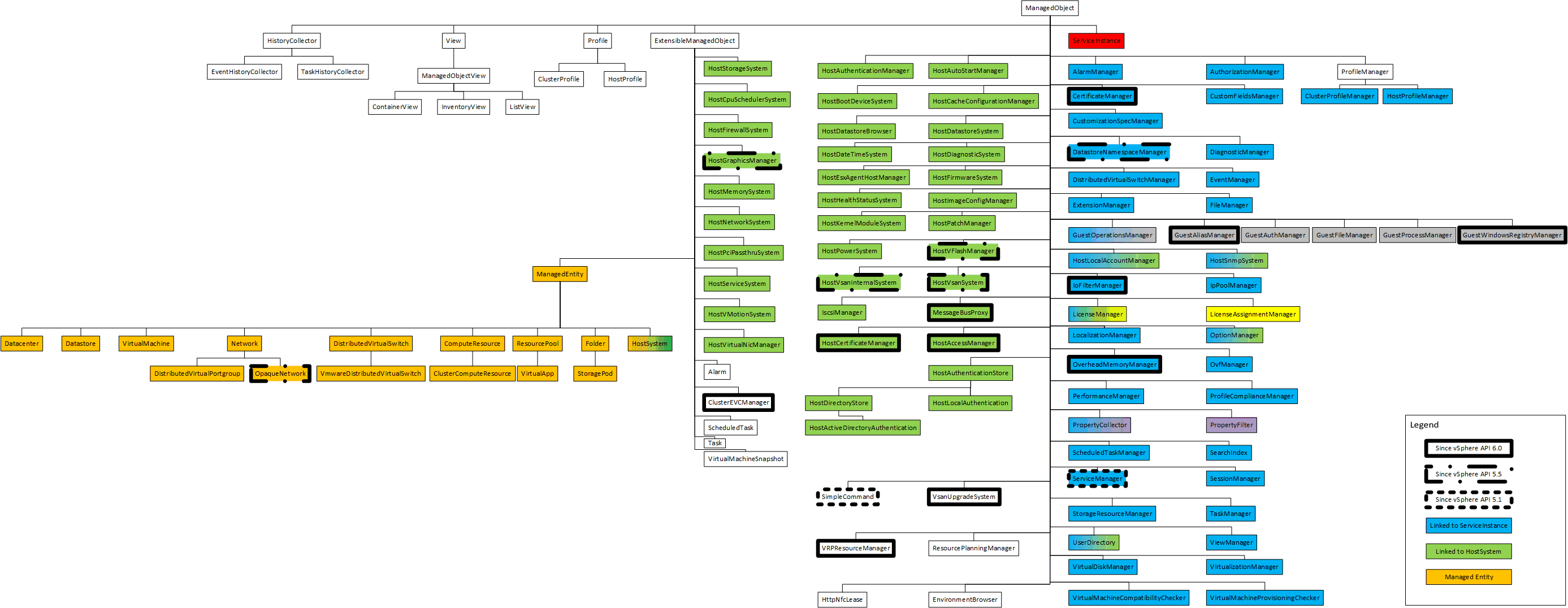
This diagram was initially created by Steve Jin, and has then been updated by William Lam.
It is now updated for the version 6.0 with 122 managed objects in total.
For more details please refer to the above two posts.
…generated partially with PowerCLI
The script below is really “rough”.
It illustrates that as described in PowerCLI study guide from rookie to guru PowerCLI is part of a rich ecosystem.
This script executed from PowerCLI, use .net and a comobject to create a visio diagram with a shape for each managed object.
$application = New-Object -ComObject Visio.Application
$application.visible = $False
$documents = $application.Documents
$document = $documents.Add("BASICD_M.VSTX")
$pages = $application.ActiveDocument.Pages
$page = $pages.Item(1)

$BASIC_MVSSX = $Application.Documents.Item("BASIC_M.VSSX")
$ShapeRectangle = $BASIC_MVSSX.Masters.ItemU("Rectangle")

function New-Shape{
param(
[Parameter(Mandatory=$true)]
$xPos,
[Parameter(Mandatory=$true)]
$yPos,
[Parameter(Mandatory=$true)]
$ShapeText,
[Parameter(Mandatory=$true)]
$ShapeTypeName
)
$NewShape = $Page.Drop($ShapeTypeName,$xPos,$yPos)
$NewShape.Text = $ShapeText
Return $NewShape
}

function New-VisioUMLConnector{
param(
[Parameter(Mandatory=$true)]
$BeginShape,
[Parameter(Mandatory=$true)]
$EndShape,
[Parameter(Mandatory=$true)]
$ConnectorShape
)
$xPos = -5
$yPos = -5

$NewConnectorShape = $Page.Drop($ConnectorShape, $xPos, $yPos)

$vsoCellBeginConnectorShape = $NewConnectorShape.CellsU("BeginX")
$vsoCellBeginShape = $BeginShape.CellsSRC(1,1,0)
$vsoCellBeginConnectorShape.GlueTo($vsoCellBeginShape)
$vsoCellEndConnectorShape = $NewConnectorShape.CellsU("EndX")
$vsoCellEndShape = $EndShape.CellsSRC(1,1,0)
$vsoCellEndConnectorShape.GlueTo($vsoCellEndShape)

Return $NewConnectorShape
}


		$visSectionObject = 1
		$visRowFill = 3
		$visFillForegnd = 0
		$visRowXFormOut = 1
		$visXFormWidth = 2
		$visSectionCharacter = 3
		$visCharacterColor = 1
		$visXFormHeight = 3
		$visFillPattern = 2
		$visFillBkgnd = 1


function get-vSphereManagedObject{
param(
$Parent,
$ParentShape,
$fullpath
)

	if($Parent){
		$fullPath2 = $fullpath + "." + $($Parent.Name)
		(([appdomain]::currentdomain.GetAssemblies()).Modules | Where-Object {$_.Name -eq 'vmware.vim.dll'}).Assembly.modules.gettypes() | where {$_.basetype.fullname -eq $Parent.fullname} | foreach-object {
			$fullPath2 = "$fullpath" + "." + $($_.Name)
			#Write-host $fullPath2
			$NewShape = $Page.Drop($ShapeRectangle,0,0)
			$NewShape.text = $_.Name
			$NewShape.CellsSRC($visSectionObject, $visRowXFormOut, $visXFormWidth).FormulaU = "TEXTWIDTH(TheText, 500 mm)"
			$NewShape.CellsSRC($visSectionObject, $visRowXFormOut, $visXFormHeight).FormulaU = "TEXTHEIGHT(TheText,500 mm)"
			if($_.Name -like "Host*"){
			$NewShape.CellsSRC($visSectionObject, $visRowFill, $visFillForegnd).FormulaU = "THEMEGUARD(RGB(146,208,80))"
			}
			New-VisioUMLConnector -BeginShape $ParentShape -EndShape $NewShape -ConnectorShape $Application.ConnectorToolDataObject
			get-vSphereManagedObject -parent $_ -fullpath $fullPath2 -ParentShape $NewShape
		}
	}
	Else {
		$Parent2 = (([appdomain]::currentdomain.GetAssemblies()).Modules | Where-Object {$_.Name -eq 'vmware.vim.dll'}).Assembly.modules.gettypes() | where {$_.fullname -eq 'VMware.Vim.ViewBase'}
		$fullPath2 = $Parent2.Name
		$NewShape = $Page.Drop($ShapeRectangle,0,0)
		$NewShape.Text = $Parent2.Name
		$NewShape.CellsSRC($visSectionObject, $visRowXFormOut, $visXFormWidth).FormulaU = "TEXTWIDTH(TheText, 500 mm)"
		$NewShape.CellsSRC($visSectionObject, $visRowXFormOut, $visXFormHeight).FormulaU = "TEXTHEIGHT(TheText,500 mm)"
		get-vSphereManagedObject -parent $Parent2 -fullpath $fullPath2 -ParentShape $NewShape
	}
}

get-vSphereManagedObject
$application.visible = $True
Notes:
It was still necessary to update the Visio diagram manually to obtain the final result.
With this method one “extra object” is created the “EntityViewBase” between the “ExtensibleManagedObject” and the “ManagedEntity”. It exists in .net but not in the API for ManagedEntity that extends ExtensibleManagedObject.
[…] This is especially useful for the hostsystem object. The majority of “methods” that you can use against a hostsystem are not associated to the “HostSystem” objects itself, but to one of the “Helping” manager objects. For example to edit CPU settings, you will need to get from the “configmanager.cpusheduler” property the Moref of the “HostSpuShedulerSystem” associated to this host. You can then use the methods “DisableHyperThreading” or “EnableHyperThreading” associated to the “view” obect HostCPUShedulerSystem. On top of the official documentation you can use the following diagram to see a visual representation of all Managed object. Extracted from VMware vSphere API Object Model […]